NoLoss
Protect the match record.
NoLoss is intended to end a losing match without adding a defeat to your record.
- Match outcome tool
- Ultimate Team group
- Check mode coverage
EA Sports FC 27 Cheats brings match controls, team sliders and Virtual Pro editing to Windows PC. Explore tools for Ultimate Team, Rivals, Champions and Pro Clubs. Cloud DMA is required and purchased separately.

NoLoss
Protect the match record.
Pro Clubs
Build your Pro Clubs player.
Win
10 / 11
Cloud DMA
Required
Features
Manage match outcomes, adjust team attributes or develop a Virtual Pro. Each group has a different job in the menu.
Protect the match record.
NoLoss is intended to end a losing match without adding a defeat to your record.
Change the matchmaking division.
Division Spoofer presents a different division to matchmaking to change the level of opponents you meet.
Adjust each side separately.
Separate sliders change your own team and the opposition without tying both sides to the same setting.
Build your Pro Clubs player.
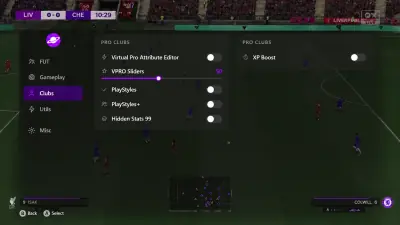
Edit Virtual Pro attributes, assign PlayStyles and PlayStyles+, and use XP Boost for progression.
Work with the ladder.
The Win/Loss Spoofer and Round Spoofer target the Champions record and round placement.
Expand on ball options.
The menu lists five star skill moves and a five star weak foot as separate gameplay controls.
Handle interruptions.
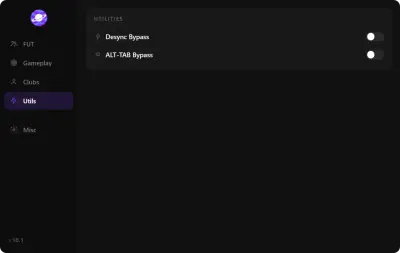
Desync Bypass and ALT TAB Bypass address connection desync and switching away from the game.
Spend less time in menus.
Skip Pack Animation shortens pack opening, while Draft Round Modifier changes the draft stage.
Plan the complete setup.
The menu needs Cloud DMA plus separate GREENWARD, Static Server and AWS purchases.
Store
Cloud DMA is required for the menu. HWID Spoofer and Skin Changer are separate tools with their own compatibility to confirm.
Match controls, gameplay sliders and a dedicated Pro Clubs editor in one football menu.
NoLoss, Division Spoofer, separate team sliders and Virtual Pro tools for FC 27 on Windows.
Hardware identifier changes and trace cleanup.
Refresh disk, network and GPU identifiers when a confirmed hardware restriction is the problem. The license includes the cleanup tool.
Required single PC infrastructure with separate service purchases.
Run the guided Hyper V environment on your Windows gaming PC, with activation through an encrypted service connection.
Local cosmetic presets; confirm your game before purchase.
Choose local weapon finishes, outfits and knife styles from a library in the supported client. The visuals stay on your display.
Why us
Compare the documented menu groups and setup needs. Availability at other providers varies.
Match outcomes
NoLoss is listed in Ultimate Team Options. Its exact trigger and feature coverage by mode need confirmation.
Team controls
Player and Opponent Sliders adjust each side separately. Individual attributes and ranges are not specified.
Virtual Pro editing
Pro Clubs has its own attribute editor, VPRO Sliders, PlayStyles, PlayStyles+, Hidden Stats 99 and XP Boost.
Session utilities
Desync Bypass and ALT TAB Bypass are listed together in the Utilities group.
Windows requirements
Windows 10/11 and Intel/AMD processors are listed. HVCI, Core Isolation, TPM and Secure Boot must be on.
Separate infrastructure
Cloud DMA runs the supported feature stack. GREENWARD, Static Server and AWS are separate required purchases.
5
Menu groups
Ultimate Team, Utilities, Gameplay, Pro Clubs and Safety.
2
Windows versions
Windows 10 and Windows 11 are the listed platforms.
1 PC
Cloud DMA setup
Hyper V runs on the same Windows gaming PC.
Setup guide
Check the full infrastructure requirements before paying. Cloud DMA and its required services are separate purchases.
Check the Windows setup
Prepare Cloud DMA
Follow the current guide
How it works
A useful purchase starts with the right Windows edition and the complete dependency list.
4 easy steps
Confirm your requirements
Check Windows, security settings, CPU virtualization and Hyper V support.
Plan separate purchases
Cloud DMA, GREENWARD, Static Server and AWS are required alongside the menu.
Review access terms
Use external checkout for current availability, delivery instructions and license conditions.
Follow the supplied guide
Confirm the current game build and feature coverage with support before the first session.
Blog
Understand the menu groups, check Cloud DMA prerequisites and compare the role of each separate utility.
Understand which controls change a match, which concern the ladder and which belong to Pro Clubs.
A purchase checklist for Windows, virtualisation, Hyper V and the separate services required by the menu.
How the Pro Clubs group differs from team sliders and match outcome controls.
FAQ
Answers for this page. The FAQ page holds the rest.