
EA Sports FC 27 Cheats for PC
Explore the five menu groups and their requirements. Cloud DMA is required for full functionality; its infrastructure and services are purchased separately.
Product Overview
At a glance
Key capabilities
The short list for EA Sports FC 27 Cheats, before the full module list.
Another 18 options are in the full list below.
Overview
EA Sports FC 27 Cheats: match and player controls
What each documented FC 27 menu group does and which details to confirm.
The menu is organised into five groups: Ultimate Team Options, Utilities, Gameplay Options, Pro Clubs Options and Safety. Its focus is football: the match record, matchmaking, separate team attributes and Virtual Pro progression.
Cloud DMA is required for full functionality. Budget for it and the separate GREENWARD, Static Server and AWS purchases before ordering. The Windows setup must also support CPU virtualisation and Hyper V.
Choose the controls around the way you play: match and ladder options for Ultimate Team, independent team adjustments in Gameplay, or a dedicated Virtual Pro group for Pro Clubs.
Ultimate Team Options
NoLoss is intended to let a losing match end without recording a defeat. Division Spoofer changes the division presented to matchmaking. Champions Win/Loss Spoofer and Champions Round Spoofer address the Champions record and round placement; Draft Round Modifier changes the draft stage. Exact triggers, ranges and mode coverage are not specified.
Opponent Name / Platform displays information about the other player. Skip Pack Animation reduces pack opening time. Instant Moment is also listed, but its precise action should be confirmed before purchase. These options belong to the same Ultimate Team menu group.
Utilities
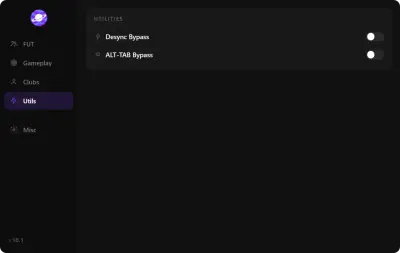
Desync Bypass addresses online connection desync. ALT TAB Bypass addresses interruptions when switching away from the game. They are session utilities; they do not edit the score, team attributes or Virtual Pro progression.
Gameplay Options
AI Auto Play is advertised as letting the game AI take over your side. Player Sliders and Opponent Sliders adjust the teams independently. Five star skill moves and five star weak foot are listed separately. Stamina Control concerns stamina, while Custom Tactics concerns tactical setup. Individual slider attributes, ranges and per mode support are not specified.
Pro Clubs Options
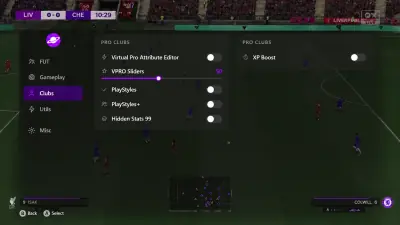
Virtual Pro Attribute Editor is the centre of the Pro Clubs group. VPRO Sliders adjust your Virtual Pro, PlayStyles and PlayStyles+ assign those traits, Hidden Stats 99 targets hidden attributes and XP Boost supports progression. Confirm which attributes are editable and whether changes persist across sessions.
Safety
Anti Ban Protection is an advertised product component. Its mechanism is not documented, and it does not establish immunity from account penalties. An undetected claim is time bound. Game or anti cheat updates may affect compatibility; no patch turnaround or lasting detection status is guaranteed.
Modules
What's included
The full option list for EA Sports FC 27 Cheats. Each line can be switched in the menu.
- NoLoss
- Division Spoofer
- Champions Win/Loss Spoofer
- Champions Round Spoofer
- Draft Round Modifier
- Opponent Name / Platform
- Skip Pack Animation
- Instant Moment
- Desync Bypass
- ALT TAB Bypass
- AI Auto Play
- Player Sliders
- Opponent Sliders
- 5 Star Skill Moves
- 5 Star Weak Foot
- Stamina Control
- Custom Tactics
- Virtual Pro Attribute Editor
- VPRO Sliders
- PlayStyles
- PlayStyles+
- Hidden Stats 99
- XP Boost
- Anti Ban Protection
Experience
Five menu groups
Match controls, gameplay sliders and a dedicated Pro Clubs editor in one football menu.
Menu features
- Layer A
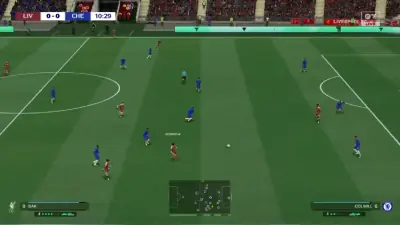
Liverpool vs Chelsea
A supplied match image with the scoreboard and minimap visible.
- Layer B
Pro Clubs menu illustration
An illustrative menu layout showing the Virtual Pro options; not evidence of an authenticated software session.
- Layer C
Utilities menu preview
The supplied panel shows the two session utility controls.
More products
Pairs well with
Utilities sold beside the cheat. Each one keeps a separate page.
- HWID Spoofer Refresh disk, network and GPU identifiers when a confirmed hardware restriction is the problem. The license includes the cleanup tool. View details: HWID Spoofer
- Cloud DMA Run the guided Hyper V environment on your Windows gaming PC, with activation through an encrypted service connection. View details: Cloud DMA
- Skin Changer Choose local weapon finishes, outfits and knife styles from a library in the supported client. The visuals stay on your display. View details: Skin Changer
FAQ
Questions about this page
Answers for this page. The FAQ page holds the rest.
Blog
Related guides
Understand the menu groups, check Cloud DMA prerequisites and compare the role of each separate utility.
Understand which controls change a match, which concern the ladder and which belong to Pro Clubs.
A purchase checklist for Windows, virtualisation, Hyper V and the separate services required by the menu.
How the Pro Clubs group differs from team sliders and match outcome controls.
Separate the required Cloud DMA stack from hardware ID changes and local cosmetic software.